“Christmas Landing Page” Documentation by “AwesomeC” - v1.0
“Christmas Landing Page”
Created: 03/12/2016 (DD/MM/YYYY)
By: AwesomeC
Thank you for purchasing my theme. If you have any questions that are beyond the scope of this help file, please feel free to email via my user page contact form here. Thanks so much!
General Information
Christmas Landing Page template is combining a beautiful parallax effect with a different style on mobile and desktop( if a gyroscope is detected, the page will tilt in the orientation of the smart device, if not, the position of the mouse cursor is used instead), with the snow effect giving a beautiful sensation of winter holidays.
Theme Features
- 1. Parallax Effect
- 2. Canvas Snow Effect
- 3. Count Down
- 4. PHP Send E-mail Form
- 5. Social Media Icons
- 6. PSD And Vector Files
- 7. Plugins Used
1) Parallax Effect
The plugin can be found in "js" directory, under the name "jquery.parallax.js". This plugin is created by Matthew Wagerfield under a MIT licence, and it use a gyroscope or the mouse movement.
The initialize of the plugin is found in the bottom of the "index.html" page. It looks like this:
		// Parallax Init
		$('#christmas_scene').parallax({
			scalarX: 5,
			scalarY: 15,
			invertY: false
		});
The plugin is easy to customize, and has the following features:
		$('#christmas_scene').parallax({
			calibrateX: false,
			calibrateY: true,
			invertX: false,
			invertY: true,
			limitX: false,
			limitY: 10,
			scalarX: 2,
			scalarY: 8,
			frictionX: 0.2,
			frictionY: 0.8,
			originX: 0.0,
			originY: 1.0
		});
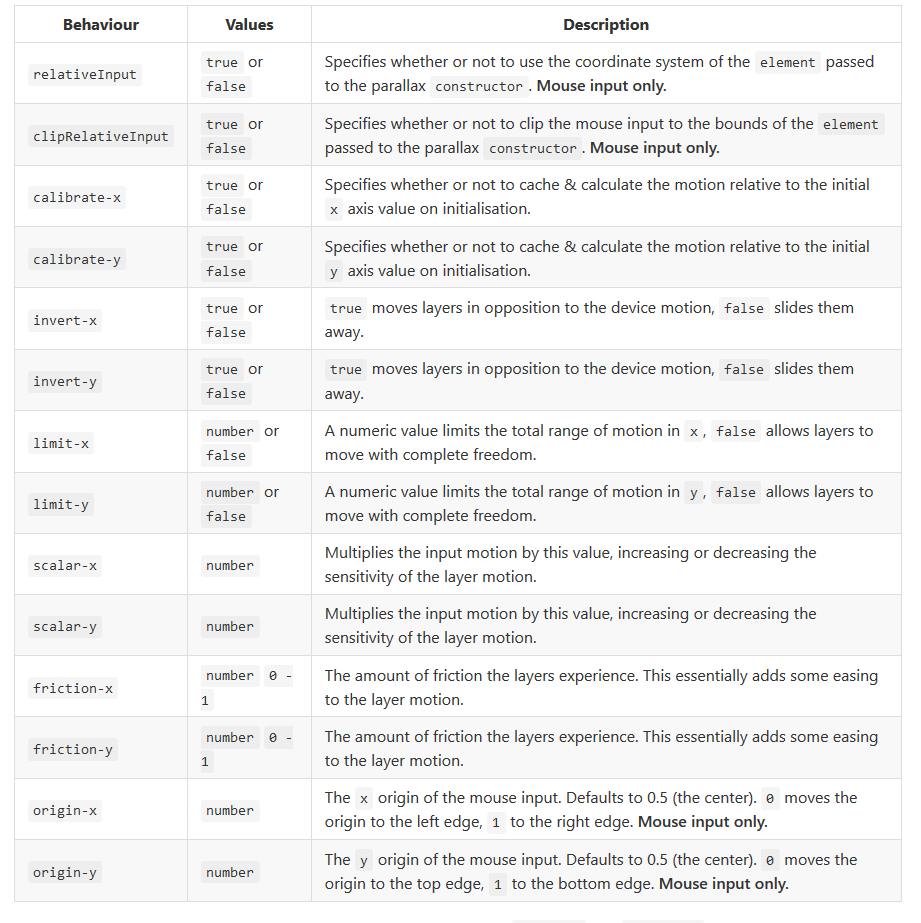
If you need more details about the plugin you can check this page.
2) Canvas Snow Effect - Go to top
Canvas snow is a light weight javascript code, and you can find this in the "js" directory, under the name "snow.js".
If you want to change the snowflake density, you can do this. Go to "js" directory, find the file with the name "snow.js" and on line 4 you will find:
 	// SnowVolume will change the density of the snowflakes
  	var SnowVolume = 800;
If you want a higher snow volume, increase the number(800 default).
If you want a smaller snow volume, decrease the number(800 default).
3) Count Down - Go to top
The plugin can be found in "js" directory, under the name "jquery.countdown.js". This plugin is created by Edson Hilios under a MIT licence.
The plugin is set up to count untill 25/12/2016 (DD/MM/YYYY). If you want to change the count down date, you can do this.
First, go to "js" directory and find the file with the name "main.js". On the line 94 you will find the plugin initialize. It looks like this:
	// The initialize of the Count Down Plugin
	$('#countdown_container').countdown('2016/12/25', function(event) { // Here you can change the date

    });
If you want a new count down date, just change the default date "2016/12/25" (YYYY/MM/DD).
If you need more details about this plugin, you cand find on this page.
4) PHP Send E-mail Form - Go to top
I have incorporated a PHP script for sending e-mails. You will need to change the default address with your own one.
To do that you need to find the file "sendmail.php" from "html" directory, and on the line 3 you need to put your address.
All the messages from the website will be sent on this e-mail.

5) Social Media Icons - Go to top
I've used the following icons and you can find them in "images/icons" folder.
- Google+
To put the link from you social media page, you need to go in "index.html" file.
On line 51 you will find the icons:

Change the "#" with the link you want to. Example:

6) PSD and Vector Files - Go to top
I've included all the PSD and Vector files for future customization if it's needed.
You can find this files in "PSD and vector files" directory.
Files included:
- PSD With Parallax Design (Parallax-background-design.psd)
- Vectorial Wood Cabin (Cabin.ai)
- Vectorial Christmas Tree (Christmas-tree.ai)
- Vectorial Count Down Globe (Count-down-globe.ai)
- Vectorial Merry Christmas Form Image (Form-merry-christmas.ai)
- Vectorial Form Pattern (Form-pattern.ai)
- Vectorial Happy New Year Image (Happy-new-year.ai)
- Vectorial Contact Pole (Mail-pole.ai)
- Vectorial Social Media Icons (Social-icons.ai)
- Vectorial Snow Pattern (Top-snow-pattern.ai)
7) Plugins Used - Go to top
Parallax Effect - This plugin is created by Matthew Wagerfield under a MIT licence.
Count Down - This plugin is created by Edson Hilios under a MIT licence.
Bootstrap - This plugin is created by @mdo and @fat under a MIT licence.
jQuery - This plugin is created by The jQuery Foundation
Once again, thank you so much for purchasing this theme. As I said at the beginning, I'd be glad to help you if you have any questions relating to this theme. No guarantees, but I'll do my best to assist. If you have a more general question relating to the themes on ThemeForest, you might consider visiting the forums and asking your question in the "Item Discussion" section.
AwesomeC